User Interface
Ribbons
priPrinter is based on Ribbons. The ribbon is at the top of the work area in the priPrinter application, which provides a consistent appearance and behavior. Tabs organize commands in logical groups.

Ribbon increases discoverability of features and functions, enables quicker learning of the priPrinter as a whole, and makes users feel more in control of their experience with the priPrinter. Each feature is easy to find and use.
Tabs
Each tab relates to a particular activity such as page layout or view.
- Page Layout tab is all about page layout.
- If you want to change appearance of text of graphics, go to Effects tab.
- Insert tab helps you to insert watermarks or images.
- Crop tab is about cropping page - e.g. removing margins or extra content.
Everything is that simple.
Quick Access Toolbar
The Quick Access Toolbar provides a way to put the commands and buttons that you use most often within easy reach. The Quick Access Toolbar appears above the ribbon on the application title bar. The Quick Access Toolbar can be easily customized by users to accommodate their working environment.

For instance you may print to any non current printer in one click, provide an ability to enter number of copies, run script. Buttons in this toolbar can be reordered
Thumbnails
Left pane contains page thumbnails. Size of thumbnails can be changed. Jobs can collapsed of exapanded. Each page can be moved to another place by mouse drag and drop.
Preview area
This is the main area of priPrinter application.
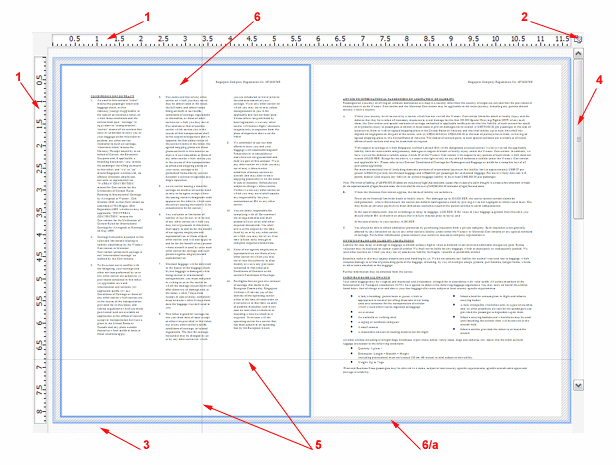
- Rulers
- Rulers switch button
- Background
- Scrollbars
- Mouse cursor. Use options dialog for cursor customization.
- Pages
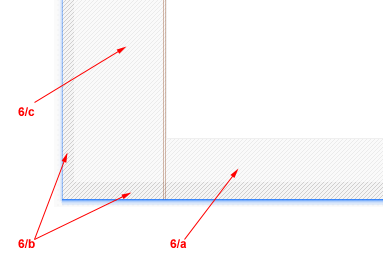
a. Margins - the white space (this space is white on the real page, however priPrinter sometimes paints margins with hatched brush)that surrounds the content of a page. The margin helps to define where a line of text begins and ends. Drag this area for adjust its size. Usually, you cannot make it smaller than hardware margins. priPrinter 3.0 has option to remove this limitation. However it is in advance feature and designed in order to provide more sophisticated page arrangement. printer in any case is unable to print in this area.
b. Hardware margins - the unprintable space. Printer cannot print in this area due to hardware limitations. Several printers may print without margins. It may be called Borderless printing and you may need to enable such feature in printer options dialog.
c. Gutter - the blank space at which two pages come together. Right click for extra options or drag it for changing gutter size. You may print gutter by selecting item in gutter RClick menu.