
priPrinter Script Reference, Extensions, Samples
Scripting
 Script is a tool that allows you to automate tasks
and add custom functionality to your printer. For instance you may define
your own page layout, delete or select pages based on your own criteria.
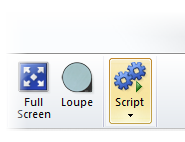
Script could be executed manually by clicking on a special button in Quick
Access Bar or started automatically, for each new print job.
Script is a tool that allows you to automate tasks
and add custom functionality to your printer. For instance you may define
your own page layout, delete or select pages based on your own criteria.
Script could be executed manually by clicking on a special button in Quick
Access Bar or started automatically, for each new print job.
With script you can:
- Control priPrinter window, ribbon and buttons.
- Load additional jobs. Close jobs.
- Get access to source pages: remove, copy, insert, change position, crop, select, etc.
- Modify layout or create a new one.
- Modify or create watermarks.
- Print, save to images or pdf.
- Add Custom button to ribbon (extensions).
- More...
For example you may print to priPrinter. Script automatically will apply required settings, print some pages to one printer, another set of pages to second printer and finally save a copy in pdf format to network drive. Of course everything can be done in background without any user interaction. In order to do this, you should put script into scripts folder and specify its name in printer preferences:
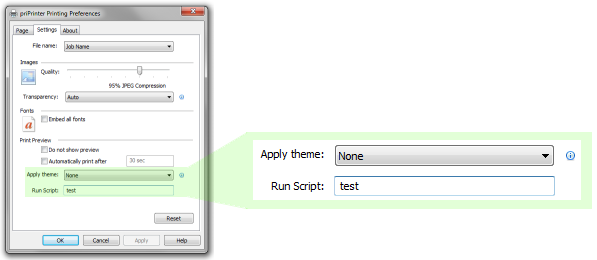
Or, script can be executed after receiving new print job. Name of the
script file should be defined in registry:
HKEY_CURRENT_USER\Software\Pelikan Software
KFT\priPrinter\Script , string value OnNewFile.
This script file should be in scripts folder and name in registry
should be short file name.
Extensions
Extension is an extended version of script. In additional to text of script itself it has images for buttons, information about commands and so on. Learn more.
Sample script:
local doc=window.GetDocument();
if(doc.numpages)
{
	local page=doc.GetPage(0);
	if(page)
	{
		doc.DeletePage(0);
		page=doc.GetPage(0);
		local i;
		for(i=0;i<10;i+=1)
		{
			local copy=doc.DuplicatePage(page);
			copy.visibility=0;
		}
	}
}else MsgBox("Document is empty");

window.SetForm("simple");
window.SetFormMode("bind","cell");
 How
to install script?
How
to install script?
If you have a script file, just put into priPrinter scripts folder and it will be available from scripts menu. If you don't know where this folder is, select View tab, click on Extensions button and choose "Extension Manager...". Click Organize button and select View Files... Windows Explorer will be opened, just drop script file there.
Script and Extension can be installed with Extension Manager.
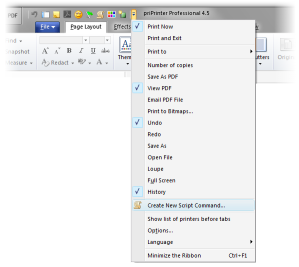
It is possible to launch script by clicking on button in Quick Access bar. In order to create such button click on Customize button and select "Create New Script Command". You will need to select name script file and icon.
Debugging
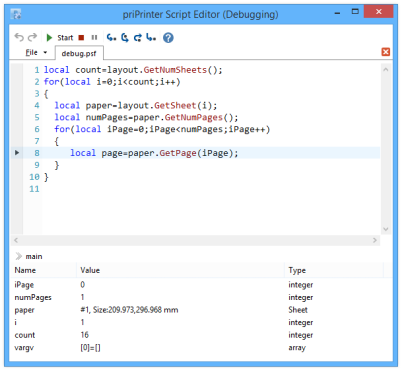
priPrinter 6.1 has build in script editor with syntax highlighting and debugger.
Implementation
priPrinter uses "Squirrel" programming language as base of scripting engine. It's small, fast and feature rich scripting engine, it perfectly fits into existing priPrinter environment.
priPrinter Scripting is part of priPrinter Professional edition.