
Server Edition
priPrinter Server Edition
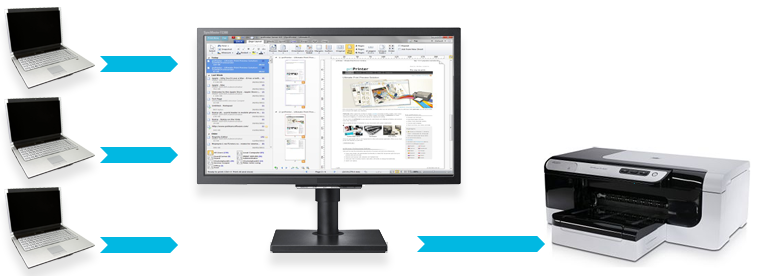
is a network based print preview solution. It provides the ability to
share a single print preview application across a network. This means, that any user can print from network computer while another
person can preview it on *Server computer.
*Server in this context is just a computer where
all print jobs can be previwed, modified, saved to PDF or printed.
Common Usage Scenarios
- In an office, colleagues or clients may print their documents to priPrinter server. A single person can then arrange them in the required order, apply any required changes, and then print or save to PDF.
- Students and teacher in the school. See real use case.
- From time to time co workers may want to send you some documents or photos to print. priPrinter Server Edition provides an easy way for doing this.
- At home you may print interesting web pages while surfing the web on your laptop computer. Your kids may print coloring pages and you can rearrange and resize them later, before printing.
This print preview computer ( we call it server ) can be used to preview, edit, combine and rearrange print jobs. Of course, page layouts, watermarks and text correction are supported. Finally, all jobs can be printed or saved to .PDF file.
priPrinter Server shows history of all printed documents and network users in a special, optional panel. Documents are arranged and grouped by date/time. Now it's very easy to find recently printed document.
Features
- All features of priPrinter Professional, including print preview, PDF and text editor
- Ability to share priPrinter preview application across network
- Print from local and network computers
- Watermark and Mark-ups
- Print History. Select your print jobs from ordered list and drag and drop job into required position
- Jobs reordering with mouse drag and drop
- List of users
- Filtering by user name
- Licensing - per server, unlimited number of clients
- Text Search across recently printed jobs
- Scripting
System Requirements
Server or Client side:
 Windows 8, 7, Vista™, XP, 2000, Server 2003, 2008. 32 and
64-bit Operating
Systems.
Windows 8, 7, Vista™, XP, 2000, Server 2003, 2008. 32 and
64-bit Operating
Systems.
 zipped priPrinter Server Edition installer