
Posters
Poster can be created from any document on any desktop printer. There is special poster mode where you can define poster size. Additional options are: overprint and markers. It is easy to print posters with priPrinter using regular office printer. For instance you may need to print drawing of A0 size with your regular LaserJet printer.
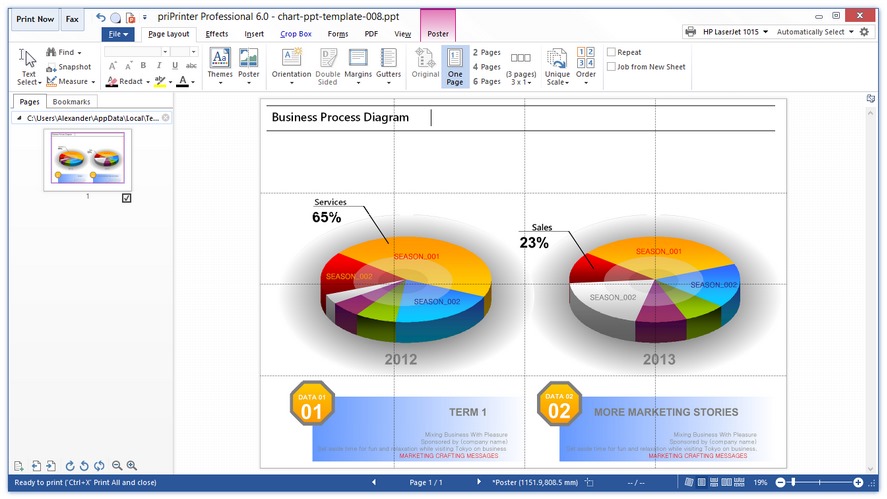
- priPrinter can make one big poster from one photo or image file.
- Also it's very easy to create large size printout from your CAD application.
Of course you can apply watermarks and markups, modify source pages in the standard priPrinter way.
1Print your photo, drawing or document to priPrinter. Or just
open already saved one.
Image files can be opened by priPrinter directly from file menu
or with help of drag & drop.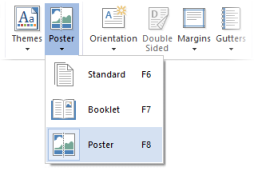
2Choose the "Poster" option. This should enable you to be able to print on several pages that can be taped together.
Please note that you may store all your settings, include poster mode into priPrinter theme file and apply it in the one click.
3Specify your size. There are two ways for this:
1. By number of pages, like "3 x 3" or "2 x 2". This affects how many sheets of paper your poster will be printed on.
2. By dimension of your poster, like 1000 x 1000 mm. In that case number of pages will be calculated automatically.
These options are defined in Page Setup dialog.
4Tape the pages together. priPrinter includes a bit of overlap areas, it should help to tape pages. You can use glue or paperclips. priPrinter can print lines which will help you to align pages against each other.
After printing you may look at the screen in order to be sure how to tape pages.
In case if something went wrong and one of pages was "damaged" you may print only that page from priPrinter again.
See also: Printing a Poster tutorial.